<?xml version="1.0" encoding="utf-8"?><feed xmlns="http://www.w3.org/2005/Atom" ><generator uri="https://jekyllrb.com/" version="3.10.0">Jekyll</generator><link href="https://www.maestral.app/feed.xml" rel="self" type="application/atom+xml" /><link href="https://www.maestral.app/" rel="alternate" type="text/html" /><updated>2026-06-28T10:11:23+00:00</updated><id>https://www.maestral.app/feed.xml</id><title type="html">Maestral</title><subtitle>Open source Dropbox client for macOS and Linux.</subtitle><author><name>Sam Schott</name></author><entry><title type="html">Maestral’s dependencies: desktop-notifier</title><link href="https://www.maestral.app/blog/python-desktop-notifier" rel="alternate" type="text/html" title="Maestral’s dependencies: desktop-notifier" /><published>2021-05-04T00:00:00+00:00</published><updated>2021-05-04T00:00:00+00:00</updated><id>https://www.maestral.app/blog/python_desktop_notifier</id><content type="html" xml:base="https://www.maestral.app/blog/python-desktop-notifier"><![CDATA[<p>Desktop notifications are a great way to keep users informed of file changes and sync
issues, especially when running a sync daemon without a GUI or system tray icon. There
are a number of existing Python libraries to send desktop notifications. Most only work
on specific platforms and require compiled extension modules (for example
<a href="https://github.com/jithurjacob/Windows-10-Toast-Notifications">win10toast</a>) others such
as <a href="https://github.com/kivy/plyer">plyer</a> are cross-platform and purely Python. However,
none of them managed to provide what I needed for Maestral:</p>

<ol>
  <li>Pure Python code base without compiled extension modules. Plyer is the only library
which fulfilled this requirement.</li>
  <li>Ability to show buttons and react to user interactions. This requires integration with
an event loop such as asyncio, the Glib main loop or Core Foundation’s <code class="language-plaintext highlighter-rouge">CFRunLoop</code>. To
my knowledge, none of the existing Python libraries supports this.</li>
  <li>Ability to manage and remove already sent notifications.</li>
  <li>Use up-to-date platform APIs: All of the Python libraries currently use the
deprecated <code class="language-plaintext highlighter-rouge">NSUserNotificationCenter</code> API on macOS.</li>
</ol>

<p>I therefore ended up writing my own module and eventually spun it off as a separate
library <a href="https://github.com/SamSchott/desktop-notifier">desktop-notifier</a>. This post gives
a brief introduction to native platforms APIs and the choices which I had to make when
writing an abstraction layer.</p>

<h2 id="platform-apis">Platform APIs</h2>

<p>Let’s start with introducing the different platforms to see what we’ll need to work
with.</p>

<h3 id="linux">Linux</h3>

<p>Most Linux desktop environments, including Gnome and KDE, implement the
<a href="https://developer.gnome.org/notification-spec/">Desktop Notifications Specification</a>. It
defines a basic DBus API to send desktop notifications and all implementations must
support basic features such as showing an app icon, a title and a message. Anything
beyond that, notably buttons (or “actions” in the language of the spec) may or may not be
supported with varying limitations. The documentation is riddled with statements such as</p>

<blockquote>
  <p>Clients should try and avoid making assumptions about the presentation and abilities of
  the notification server.</p>
</blockquote>

<p>At least we have a single, convenient API to work with and an easy way to query the
capabilities of a notification server. Python also has several DBus libraries that
integrate with common event loops and some don’t even require compiled extension modules.</p>

<p>Many Python packages which don’t want to use the DBus API directly instead rely on the
<code class="language-plaintext highlighter-rouge">notify-send</code> command line tool, available with most distributions. Since this requires
calling an external executable, it is not possible to listen to DBus signals and react
to user interactions with the notification when using <code class="language-plaintext highlighter-rouge">notify-send</code>.</p>

<h3 id="macos">macOS</h3>

<p>The macOS API has been transitioning over the past few releases from the now deprecated
<a href="https://developer.apple.com/documentation/foundation/nsusernotificationcenter">NSUserNotificationCenter</a>
to the more modern <a href="https://developer.apple.com/documentation/usernotifications/unusernotificationcenter">UNUserNotificationCenter</a>
library.</p>

<p>The former was introduced in OS X Mountain Lion and is currently still available in
macOS 11. The latter is available on both macOS and iOS and introduces new capabilities
such as an unlimited number of buttons, previews of notification attachments and providing
completely custom views. You can therefore show almost any user interface inside a
desktop notification, for instance a full game of <a href="https://t.co/LlMx2AjvHH">Flappy Bird</a>
🐥</p>

<p>Because both iOS and macOS give users fine-grained control over which apps are allowed
to send which types of desktop notifications, only signed app bundles or frameworks can
send notifications. This prevents a (potentially compromised) app from impersonating any
other app or circumventing the user’s settings.</p>

<p>This introduces some difficulties when sending notifications from a Python interpreter.
In practice, the <code class="language-plaintext highlighter-rouge">UNUserNotificationCenter</code> API can only be used from a signed framework
build of Python, as available from <a href="python.org">python.org</a>, but not from a regular
build as provided for instance by Homebrew. In addition, notifications will always
appear to come from “Python” unless the module has been bundled and distributed as a
standalone app.</p>

<p>The <code class="language-plaintext highlighter-rouge">UNUserNotificationCenter</code> library can be accessed via
<a href="https://docs.python.org/3/library/ctypes.html">ctypes</a> or more conveniently by using a
Python to Objective-C bridge such as <a href="https://github.com/ronaldoussoren/pyobjc">PyObjC</a> or
<a href="https://beeware.org/project/projects/bridges/rubicon/">Rubicon Objective-C</a>.</p>

<h3 id="windows">Windows</h3>

<p>Windows, with its history of different GUI libraries, is a bit more complicated. Good old
<code class="language-plaintext highlighter-rouge">win32</code> provides the
<a href="https://docs.microsoft.com/en-us/windows/win32/api/shellapi/nf-shellapi-shell_notifyiconw">Shell_NotifyIconW</a>
API which can accessed over FFI / ctypes and can even show modern “toast” notifications
on Windows 10. It is however limited to just showing an icon, a title and a message.
Popular Python packages such as <code class="language-plaintext highlighter-rouge">win10toast</code> use this approach.</p>

<p>Richer features such as image previews, interactive buttons, etc, are currently only
available through the Windows Runtime APIs which can only be access using pre-compiled
Python packages such as <a href="https://github.com/Microsoft/xlang/tree/master/src/package/pywinrt/projection">Python/WinRT</a>.</p>

<h2 id="python-implementation">Python implementation</h2>

<p>Dealing with those very different native APIs, I was faced with a number of choices for
the abstraction layer:</p>

<h3 id="sync-vs-async">Sync vs async</h3>

<p>On the surface, this seems like an easy choice. A synchronous API can be called from
any function and does not require spinning an event loop. It is therefore more
convenient to the user of the library. When looking at the problem more closely,
through, many native API are actually asynchronous. This certainly holds for the DBus API.
<code class="language-plaintext highlighter-rouge">UNUnserNotificationCenter</code> similarly exposes mostly asynchronous methods that take a
callable “completion handler” as an argument which will be called with a result after
the async call has completed (e.g., after the notification has been scheduled). In
addition, dealing with user interactions requires spinning an event loop anyways. An
asynchronous API is therefore the more natural choice.</p>

<h3 id="supported-features">Supported features</h3>

<p>We have seen previously that the available features vary significantly between
platforms, desktop environments and different APIs on the same platform. Do we want to
support only the smallest common denominator of features? Or can we live with a
“leaky” abstraction which exposes features that might not work on some platforms?
And how do we handle unsupported options?</p>

<p>I decided to live with a leaky abstraction and to ignore any provided arguments such as
buttons, custom icons or sounds, when not supported by a platform. Instead of raising an
exception, we will only emit a warning.</p>

<p>An overview of supported features in the desktop-notifier library is given
<a href="https://desktop-notifier.readthedocs.io/en/latest/background/platform_support.html">here</a>.</p>

<h3 id="event-loop-intgeration">Event loop intgeration</h3>

<p>We know that some form of event loop integration will be necessary to handle user
interaction. Do we want to integrate directly with platform-native event loops such Apple’s
<a href="https://developer.apple.com/documentation/corefoundation/cfrunloop-rht">CFRunLoop</a> on
or the <a href="https://developer.gnome.org/glib/stable/glib-The-Main-Event-Loop.html">GLib main loop</a>
in Gtk?</p>

<p>I opted for the easier but less convenient solution of only supporting Python’s asyncio
event loop. Users can then choose to integrate the asyncio event loop directly with native
event loops themselves if required. On macOS or iOS, this can be done using
<a href="`https://rubicon-objc.readthedocs.io/en/latest/how-to/async.html#integrating-asyncio-with-corefoundation`">Rubicon Objective-C</a>:</p>

<div class="language-python highlighter-rouge"><div class="highlight"><pre class="highlight"><code><span class="kn">import</span> <span class="nn">asyncio</span>
<span class="kn">from</span> <span class="nn">rubicon.objc.eventloop</span> <span class="kn">import</span> <span class="n">EventLoopPolicy</span>

<span class="c1"># Install the event loop policy
</span><span class="n">asyncio</span><span class="p">.</span><span class="n">set_event_loop_policy</span><span class="p">(</span><span class="n">EventLoopPolicy</span><span class="p">())</span>
</code></pre></div></div>

<p>Integration with the Glib main loop can be done using
<a href="https://github.com/jhenstridge/asyncio-glib/">asyncio-glib</a>:</p>

<div class="language-python highlighter-rouge"><div class="highlight"><pre class="highlight"><code><span class="kn">import</span> <span class="nn">asyncio</span>
<span class="kn">import</span> <span class="nn">asyncio_glib</span>

<span class="c1"># Install the event loop policy
</span><span class="n">asyncio</span><span class="p">.</span><span class="n">set_event_loop_policy</span><span class="p">(</span><span class="n">asyncio_glib</span><span class="p">.</span><span class="n">GLibEventLoopPolicy</span><span class="p">())</span>
</code></pre></div></div>

<h3 id="native-bridges">Native bridges</h3>

<p>I chose <a href="https://python-dbus-next.readthedocs.io">python-dbus-next</a> as a DBus library
because of the excellent asyncio integration and because of pure Python 3 code base.</p>

<p>Similarly, I opted for
<a href="https://beeware.org/project/projects/bridges/rubicon/">Rubicon Objective-C</a> as a bridge
to Objective-C because it written purely in Python and because it is much more convenient
than using ctypes directly.</p>

<p>desktop-notifier currently does not support Windows, partially because I am still
undecided whether to rely on extension modules or just use ctypes and sacrifice
functionality. However, an implementation using
<a href="https://github.com/Microsoft/xlang/tree/master/src/package/pywinrt/projection">Python/WinRT</a>
is currently in development.</p>

<h2 id="example-usage">Example usage</h2>

<p>The final library with all of its features and limitations is documented
<a href="https://desktop-notifier.readthedocs.io">here</a>. It enables you to send a simple desktop
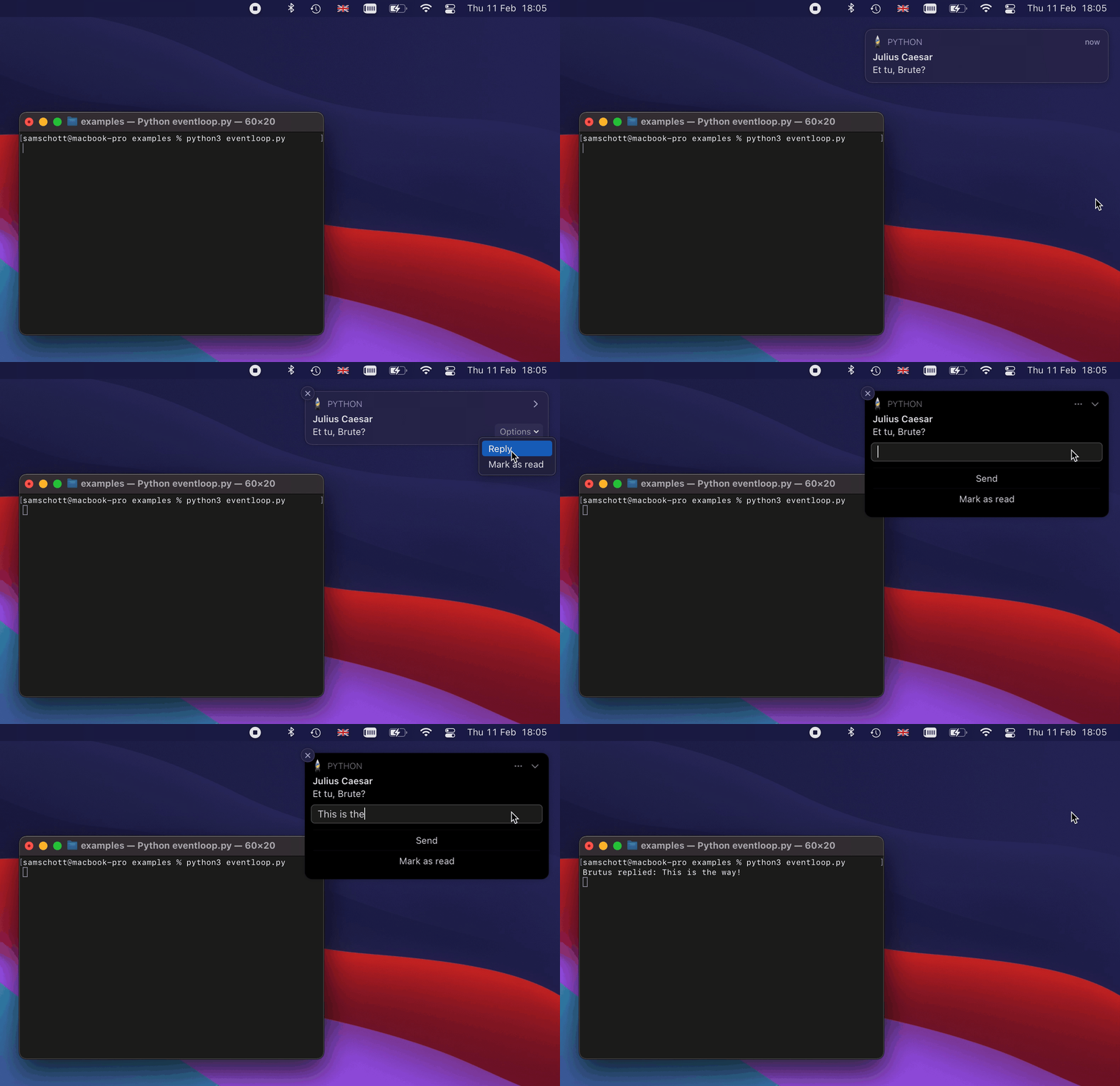
notification with buttons, a reply field and callbacks with just a few lines of code:</p>

<figure class="">
  <picture><img src="/assets/images/macOS-desktop-notifier.gif" alt="desktop-notifier on macOS" style="" />
  </picture></figure>

<p>The above examples uses the following code:</p>

<div class="language-python highlighter-rouge"><div class="highlight"><pre class="highlight"><code><span class="kn">import</span> <span class="nn">asyncio</span>
<span class="kn">import</span> <span class="nn">platform</span>
<span class="kn">from</span> <span class="nn">desktop_notifier</span> <span class="kn">import</span> <span class="n">DesktopNotifier</span><span class="p">,</span> <span class="n">Button</span><span class="p">,</span> <span class="n">ReplyField</span>


<span class="n">notifier</span> <span class="o">=</span> <span class="n">DesktopNotifier</span><span class="p">()</span>


<span class="k">async</span> <span class="k">def</span> <span class="nf">main</span><span class="p">():</span>

    <span class="k">await</span> <span class="n">notifier</span><span class="p">.</span><span class="n">send</span><span class="p">(</span>
        <span class="n">title</span><span class="o">=</span><span class="s">"Julius Caesar"</span><span class="p">,</span>
        <span class="n">message</span><span class="o">=</span><span class="s">"Et tu, Brute?"</span><span class="p">,</span>
        <span class="n">buttons</span><span class="o">=</span><span class="p">[</span>
            <span class="n">Button</span><span class="p">(</span>
                <span class="n">title</span><span class="o">=</span><span class="s">"Mark as read"</span><span class="p">,</span>
                <span class="n">on_pressed</span><span class="o">=</span><span class="k">lambda</span><span class="p">:</span> <span class="k">print</span><span class="p">(</span><span class="s">"Marked as read"</span><span class="p">),</span>
            <span class="p">),</span>
        <span class="p">],</span>
        <span class="n">reply_field</span><span class="o">=</span><span class="n">ReplyField</span><span class="p">(</span>
            <span class="n">title</span><span class="o">=</span><span class="s">"Reply"</span><span class="p">,</span>
            <span class="n">button_title</span><span class="o">=</span><span class="s">"Send"</span><span class="p">,</span>
            <span class="n">on_replied</span><span class="o">=</span><span class="k">lambda</span> <span class="n">text</span><span class="p">:</span> <span class="k">print</span><span class="p">(</span><span class="s">"Brutus replied:"</span><span class="p">,</span> <span class="n">text</span><span class="p">),</span>
        <span class="p">),</span>
        <span class="n">on_clicked</span><span class="o">=</span><span class="k">lambda</span><span class="p">:</span> <span class="k">print</span><span class="p">(</span><span class="s">"Opening chat app"</span><span class="p">),</span>
    <span class="p">)</span>


<span class="k">if</span> <span class="n">platform</span><span class="p">.</span><span class="n">system</span><span class="p">()</span> <span class="o">==</span> <span class="s">"Darwin"</span><span class="p">:</span>

    <span class="c1"># Integrate with CFRunLoop.
</span>    <span class="kn">from</span> <span class="nn">rubicon.objc.eventloop</span> <span class="kn">import</span> <span class="n">EventLoopPolicy</span>

    <span class="n">asyncio</span><span class="p">.</span><span class="n">set_event_loop_policy</span><span class="p">(</span><span class="n">EventLoopPolicy</span><span class="p">())</span>


<span class="c1"># Schedule main function and run event loop.
</span><span class="n">loop</span> <span class="o">=</span> <span class="n">asyncio</span><span class="p">.</span><span class="n">get_event_loop</span><span class="p">()</span>
<span class="n">loop</span><span class="p">.</span><span class="n">create_task</span><span class="p">(</span><span class="n">main</span><span class="p">())</span>
<span class="n">loop</span><span class="p">.</span><span class="n">run_forever</span><span class="p">()</span>
</code></pre></div></div>

<p>If you like the approach taken by this library and would like to help with developing the
Windows backend, do get in touch!</p>]]></content><author><name>Sam Schott</name></author><category term="development" /><category term="dependencies" /><summary type="html"><![CDATA[Desktop notifications are a great way to keep users informed of file changes and sync issues, especially when running a sync daemon without a GUI. This blog post covers differences in native platform APIs and outlines how and why I wrote my own Python module for cross-platform desktop notifications.]]></summary></entry><entry><title type="html">Maestral’s dependencies: survey</title><link href="https://www.maestral.app/blog/python-survey" rel="alternate" type="text/html" title="Maestral’s dependencies: survey" /><published>2021-04-29T00:00:00+00:00</published><updated>2021-04-29T00:00:00+00:00</updated><id>https://www.maestral.app/blog/python_survey</id><content type="html" xml:base="https://www.maestral.app/blog/python-survey"><![CDATA[<p>Maestral has a large number of dependencies, both direct and indirect. Those range from
well-known staples of the Python ecosystem such as <code class="language-plaintext highlighter-rouge">requests</code> and <code class="language-plaintext highlighter-rouge">sqlalchemy</code> to a few
lesser known packages which have not (yet) reached the popularity they deserve. This
post is the first in a series that highlights some of the latter. It starts off with
<a href="https://github.com/Exahilosys/survey">survey</a>, a Python package which provides
tastefully formatted, interactive command line prompts.</p>

<p>Maestral uses <a href="https://click.palletsprojects.com">click</a>, which is part of the pallets
project, to generate its command line interface (CLI). Click makes it easy to create
nested commands, generates well-formatted help pages, and supports lazy loading of
subcommands at runtime. It also provides a few utilities for interactive command line
tools such as basic prompts and progress bars.</p>

<p>For a sync client, it is sometimes convenient to allow for more complex inputs. The
selective sync dialog for instance provides a list of folders which checkboxes to
include or exclude them from syncing:</p>

<figure class="">
  <picture><source srcset="/assets/images/selective-sync-dark.png" media="(prefers-color-scheme: dark)" /><img src="/assets/images/selective-sync.png" alt="Selective sync" style="" />
  </picture></figure>

<p>This dialog is shown both when setting up a new account and on-demand from the
settings pane.</p>

<p>Such a “multiple selection” interface is more difficult to achieve in the command line.
Before version 1.3.0, we would iterate over all top level folders and prompt the user
whether to include each of them individually. This could quickly become a very tedious
task for a large number of top-level folders.</p>

<p>Wouldn’t it be much nicer to provide a similar interface as the GUI does, with a
scrollable list of folders and checkboxes?</p>

<div class="language-plaintext highlighter-rouge"><div class="highlight"><pre class="highlight"><code>Choose which folders to include  [move: ↑↓ | pick: → | unpick: ←]
  [ ] Invoices
&gt; [x] Refurbishing project
  [x] Summer 2018 pictures
  [x] Summer 2019 pictures
</code></pre></div></div>

<p>This is rhetoric question, of course it would! This example demonstrates that interactive
prompts are more than a fancy gimmick. They can enable entirely new types of user
interfaces in the command line and vastly simplify the user interaction.</p>

<p>Implementing this from scratch would be well beyond the scope of this project but it
turns out that there are already a number of Python libraries which do exactly that. I’ll
give a brief overview over the main choices here and explain why I decided to use
<a href="https://github.com/Exahilosys/survey">survey</a>, an arguably lesser known option.</p>

<h2 id="prompt-toolkit">Prompt Toolkit</h2>

<p><a href="https://github.com/prompt-toolkit/python-prompt-toolkit">Prompt Toolkit</a> is the Python
standard for interactive command line tools. It is battle-tested, powerful, versatile
and supports a wide range of platforms. It can be used to build entire interactive
consoles and is used for instance for the well known IPython console. The authors
advertise that it is lightweight and this is certainly true for the provided feature
set.</p>

<p>Because Prompt Toolkit is a general purpose library, it would still require a lot of
work to write the actual prompts needed for our CLI. Furthermore, despite its small size
for the provided feature set, it does require at least 10 MB of memory at runtime.</p>

<h2 id="pyinquirer">PyInquirer</h2>

<p><a href="https://github.com/CITGuru/PyInquirer">PyInquirer</a> is based on Prompt Toolkit and
provides common prompts needed for Maestral out-of-the-box. It makes a few questionable
style choices by default but those are a matter of taste and can be customised. Its
major downside for adoption by Maestral is again the “large” Prompt Toolkit dependency.</p>

<h2 id="bullet">Bullet</h2>

<p>With 0.7 MB of memory usage at runtime, <a href="https://github.com/bchao1/bullet">bullet</a> is
properly lightweight for our purposes. Its claim of providing “beautiful” prompts is
questionable but this can again be customised. However, at the time of writing, it only
accepts ASCII input. This blocks its adaption by Maestral which regularly deals with
file names that contain non-ASCII characters.</p>

<h2 id="survey">Survey</h2>

<p>After almost giving up on the convenience of interactive dialogs, I came across
<a href="https://github.com/Exahilosys/survey">survey</a>. Survey is closely modelled after the
<a href="https://github.com/AlecAivazis/survey">similarly named GoLang library</a> that is used for
instance in the excellent GitHub command line tool.</p>

<p>Here is an example of a prompt with default styling:</p>

<p><img src="/assets/images/survey-showcase-2.gif" alt="Survey showcase" /></p>

<p>This will look very familiar to you if you have been using Maestral’s CLI, we practially
do not apply any custom styling to the excellent defaults.</p>

<p>Survey also qualifies as lightweight. It does import Python’s relatively heavy asyncio
module. However, because Maestral imports asyncio independently anyways, the total
memory usage increases only by 0.5 MB.</p>

<p>Maestral uses interactive prompts for other commands beside the setup dialog. For
instance, the <a href="/cli/diff"><code class="language-plaintext highlighter-rouge">diff</code></a> and <a href="/cli/restore"><code class="language-plaintext highlighter-rouge">restore</code></a> commands can both provide a list of past file versions when no version
number is given as an argument. Those lists are fetched from Dropbox servers on-demand.
The same workflow previously required two commands: First fetch all revisions numbers for
a file with the <code class="language-plaintext highlighter-rouge">history</code> command and then pass a revision number as an argument to
<code class="language-plaintext highlighter-rouge">diff</code> or <code class="language-plaintext highlighter-rouge">restore</code>. Having interactive dialogs enables us to remove the first step.</p>

<p>Have a look at the <a href="https://survey.readthedocs.io">documentation</a> to see what is
possible with Survey and try it out if you like what you see!</p>

<p>The next blog post will cover Python libraries to send desktop notifications, another
rabbit-hole of popular packages which don’t quite do the job…</p>]]></content><author><name>Sam Schott</name></author><category term="development" /><category term="dependencies" /><summary type="html"><![CDATA[Interactive command line prompts in Python: Which packages are available? How do they compare? How do they perform? This post explains why I choose a relatively niche package called "survey".]]></summary></entry></feed>